There is something genuinely satisfying about picking up a controller and playing the games you grew up with no complicated setup, no expensive hardware, no waiting for downloads. That is exactly the experience the HSSGameStick was designed to deliver. This compact little device has quietly earned a loyal following among retro gaming fans, casual players, and families looking for affordable entertainment that works right out of the box.
Whether you just bought one, are thinking about it, or simply want to understand what the device can actually do, this guide covers everything you need to know — from what it is and how it works, to setup, settings, tips, and honest limitations.
What Is the HSSGameStick?
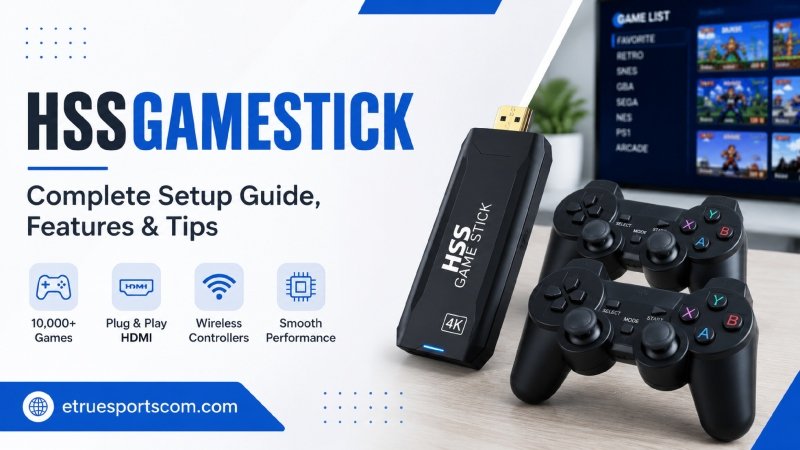
The HSSGameStick is a compact, plug-and-play retro gaming device that connects directly to any TV or monitor through an HDMI port. It looks similar to a USB stick, which makes it easy to carry and store. Inside that small frame, however, is a surprisingly capable system that runs on Android-based software and supports thousands of classic games from older console generations.
Instead of using physical cartridges or discs, the device relies on built-in emulation software to run games. Most models come preloaded with anywhere between 10,000 and 20,000 classic titles depending on the version, covering systems like NES, SNES, Sega Genesis, Game Boy Advance, arcade classics, and even some PlayStation 1 titles. Games are neatly organized by console type, making it easy to browse a library without feeling overwhelmed.
💡 Key Point: The HSSGameStick is not designed to compete with modern consoles. It is built for one thing — delivering a smooth, accessible retro gaming experience without the cost or complexity of original hardware.
Who Is the HSSGameStick For?
One of the most honest things to say about this device is that it is not for everyone — and that is fine. Understanding who benefits most from it helps set realistic expectations before making a purchase decision.
The HSSGameStick works particularly well for nostalgia enthusiasts who want to revisit games from their childhood without hunting for aging cartridges and original consoles. It also suits families looking for a simple, affordable gaming option that children can use without supervision or technical help. Casual players who enjoy classic titles occasionally but do not want to invest in a full modern gaming setup find it a practical choice as well.
However, if your primary interest is modern, graphics-heavy gaming — the kind of experience you get from a PlayStation 5 or Xbox Series X — this device is not built for that. It excels at what it does, and what it does is retro gaming, done simply and affordably.
Setup — Getting Started in Minutes
One of the most frequently praised aspects of the HSSGameStick is how quickly users can get started. There are no installations, no lengthy updates, and no configuration required for basic play. Here is how the initial setup works:
Step 1 — Connect to Your TV Plug the device directly into any available HDMI port on your television or monitor. Most modern TVs have at least two HDMI ports, so finding one is rarely an issue.
Step 2 — Power the Device The HSSGameStick requires a power source through its USB connection. Plug the USB cable into a TV USB port or a standard USB wall adapter. The device powers on automatically once connected.
Step 3 — Sync the Controller Most models include at least one wireless controller. Turn it on and wait for it to pair with the device. The pairing process typically takes under thirty seconds and does not require any technical knowledge.
Step 4 — Select Your Language On first launch, the system will prompt you to choose a preferred language. Once selected, you land directly on the main menu where games are organized by console type.
Step 5 — Start Playing Browse the library, select a game, and play. That is genuinely all it takes for basic use.
⚠️ Note: Some users on older television models have reported occasional audio sync issues. If this happens, checking the TV’s audio output settings usually resolves the problem quickly.
Manual Settings — Where the Real Potential Lives
Most people plug in the HSSGameStick, start playing, and never touch the settings menu. That approach works fine, but it leaves a significant amount of the device’s potential untouched. Spending fifteen to twenty minutes adjusting the manual settings transforms the experience noticeably.
Display Settings
The display settings allow you to adjust screen resolution, aspect ratio, and visual filters. Matching the resolution to your specific TV prevents blurry output and improves overall image quality. Some models also include CRT filters — a visual effect that mimics the scanline look of older televisions, which many retro gaming fans genuinely prefer for the authentic feel it creates.
Controller Configuration
Button mapping is one of the most useful features the device offers. Rather than accepting the default control layout, you can reassign buttons to match your personal preference. This is particularly valuable for fighting games and racing titles where control feel makes a meaningful difference. Once you find a layout that suits you, muscle memory develops quickly and gameplay becomes more natural and responsive.
Sensitivity adjustment is also available. Lower sensitivity provides more precise control for games that reward careful movement, while higher sensitivity works better for fast-paced titles that demand quick reactions. Experimenting with both settings across a few different game types helps you find what works best for your playing style.
Save States
This is one of the most practical improvements the HSSGameStick offers over original hardware. Classic games from the NES and SNES era did not have save functions — if you turned the console off, you lost your progress. The device’s save state feature changes that entirely. You can save your current position at any point, create multiple save slots for different playthroughs, and load previous saves whenever needed.
For anyone who played these games decades ago and remembers the frustration of losing hours of progress to a power cut or an accidental reset, this feature alone makes the device feel like a meaningful upgrade over original hardware.
Performance Settings
Power and performance settings control how the device manages heat and processing load during extended sessions. Disabling auto-sleep during gaming is one adjustment worth making immediately — the default sleep timer can interrupt longer sessions at inconvenient moments. Adjusting graphics quality within the settings menu can also reduce performance lag if you notice slowdown during more demanding titles.
Game Library — What to Expect
The HSSGameStick comes preloaded with a large library of classic games covering multiple console generations. The exact number varies by model, but most versions include titles from the following systems:
| Console | Era | Notable Titles |
| NES | 8-bit | Super Mario Bros, Contra, Mega Man |
| SNES | 16-bit | Super Mario World, Street Fighter II |
| Sega Genesis | 16-bit | Sonic the Hedgehog, Mortal Kombat |
| Game Boy Advance | Handheld | Pokemon series, Castlevania |
| Arcade (MAME) | Various | Pac-Man, Street Fighter, Galaga |
| PlayStation 1 | 32-bit | Selected titles on compatible models |
Additionally, some models support library expansion through a microSD card slot, allowing users to add their own game files and extend the library beyond what comes preloaded. This feature significantly increases the device’s long-term value for users who want access to a broader range of titles.
Honest Strengths and Limitations
No device is perfect, and the HSSGameStick is no exception. Understanding both sides of the experience helps set accurate expectations.
What It Does Well
The device genuinely delivers on its core promise. Setup is fast, the library is large, the price point is accessible — typically under fifty dollars depending on the model and retailer — and the plug-and-play experience works as described. Performance on 8-bit and 16-bit titles is smooth with minimal lag. The save state feature adds genuine convenience that original hardware never offered.
Furthermore, the portability is a real advantage. The device fits in a pocket, which means it travels easily and works on any television with an HDMI port. Visiting family, staying in a hotel, or simply moving between rooms requires no more effort than carrying the device and its controller.
Where It Falls Short
Occasional controller pairing issues have been reported across several user accounts, particularly during initial setup or after extended use. These are generally resolved by restarting the device and re-pairing the controller, but it is worth knowing about before purchasing.
Performance on 32-bit titles — particularly PlayStation 1 games — is less consistent than on earlier generation systems. Some titles run smoothly while others show noticeable slowdown or graphical issues. If PS1 gaming is your primary interest, it is worth researching which specific titles perform well on the device before committing.
The device is also not designed for online play, modern game streaming, or downloadable content in the traditional sense. It functions as a self-contained retro system, and its value should be evaluated on those terms
Tips for Getting the Most Out of Your HSSGameStick
A few practical habits make a meaningful difference in long-term satisfaction with the device:
Spend time in the settings menu early. Adjusting display, controller, and performance settings before diving into games saves frustration later. An hour spent on configuration early pays back significantly in a smoother ongoing experience.
Use save states consistently. Classic games were not designed with save functions, which means they can be brutally unforgiving. Using the save state feature generously removes that frustration and makes longer, more challenging titles genuinely enjoyable rather than exhausting.
Organize your favorites. Most models allow you to mark frequently played titles as favorites, creating a shortcut list that bypasses the full library browser. Setting this up early saves time during every subsequent session.
Keep the device ventilated. During extended play sessions, ensure the device has adequate airflow around it. Blocking the device against a wall or enclosed space can cause heat buildup that affects performance over time.
🎯 Pro Tip: If you experience performance lag during a session, the quickest fix is to reduce graphics quality in the display settings and close any background applications running in the system. Most lag issues resolve immediately with these two adjustments.
Frequently Asked Questions
What consoles does the HSSGameStick emulate?
The device emulates multiple classic console systems including NES, SNES, Sega Genesis, Game Boy Advance, arcade systems through MAME, and selected PlayStation 1 titles depending on the model. Games are organized by console type in the main menu for easy browsing.
Does the HSSGameStick require an internet connection?
No. The device works entirely offline. All preloaded games are stored on internal memory and function without any internet connection. Some models support Wi-Fi for additional features, but it is not required for standard play.
Can I add more games to the HSSGameStick?
Yes, on models with a microSD card slot. You can expand the game library by adding compatible game files to a microSD card and inserting it into the device. The system reads the additional files and adds them to the existing library automatically.
How many controllers does the HSSGameStick support?
Most models support two wireless controllers simultaneously, making local multiplayer available for compatible titles. Check the specific model details before purchasing if two-player play is a priority for you.
Is the HSSGameStick worth buying in 2026?
For retro gaming fans, casual players, and families looking for affordable plug-and-play entertainment, yes. At a price point typically under fifty dollars, the combination of a large preloaded library, simple setup, save state functionality, and genuine portability delivers strong value. It is not a replacement for modern gaming consoles, but it was never designed to be.
Final Thoughts
The HSSGameStick earns its following by doing something specific very well. It removes the barriers between a player and their favorite classic games — no cartridge hunting, no expensive original hardware, no complicated setup. You plug it in, pick up the controller, and you are playing within minutes.
The manual settings, save states, and library expansion options give users who want more depth a clear path to a significantly improved experience. However, even users who never open the settings menu get a functional, enjoyable retro gaming device that delivers on its core promise.
Looking for more details.